
Technology
Switching to KDE Plasma 6.6 Transforms Linux Desktop Experience

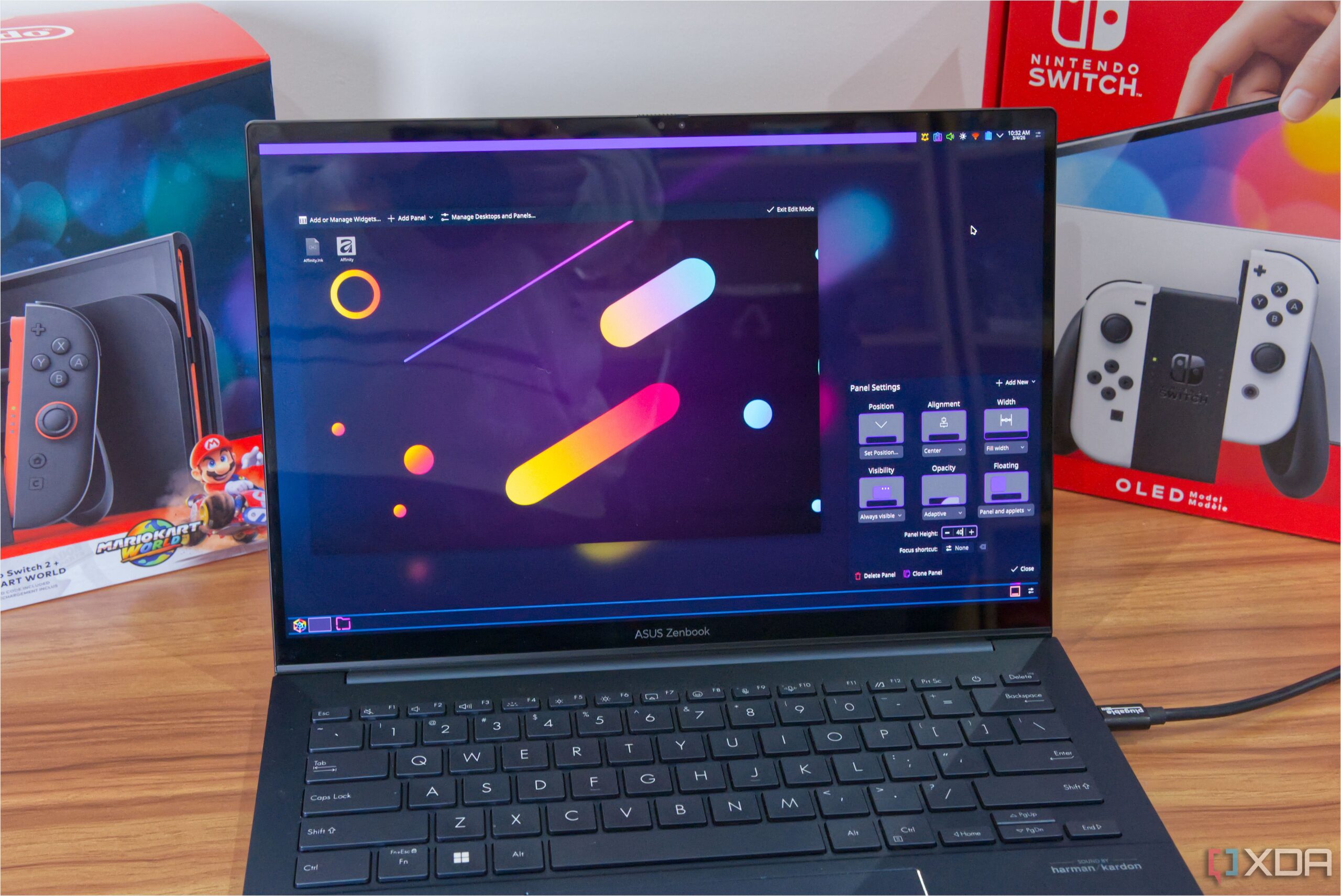
The transition from the GNOME desktop environment to KDE Plasma 6.6 has significantly enhanced the user experience for many Linux users. While GNOME is widely recognized as the default desktop for popular distributions such as Ubuntu, Debian, and Fedora, KDE Plasma 6.6 has emerged as a compelling alternative that addresses common complaints associated with GNOME.
For individuals accustomed to Windows, KDE Plasma offers a familiar interface that eases the transition to Linux. The taskbar, akin to the Windows taskbar, provides an intuitive layout for users navigating their applications. Unlike GNOME, which often overwhelms users with an expansive application launcher, KDE maintains context by allowing users to access applications without disrupting their workflow.
Customization and User Control
Another standout feature of KDE Plasma is its robust yet accessible customization options. GNOME’s customization relies heavily on extensions, which can be cumbersome to navigate. In contrast, KDE Plasma simplifies the process by allowing users to modify their desktop directly through its interface. The taskbar, referred to as a panel in KDE, can be adjusted by adding applets and moving them around effortlessly.
This flexibility extends to visual customization as well. The System Settings application includes a comprehensive theming section, enabling users to choose global themes, icon themes, and color schemes. Previews of each theme help users select options that align with their preferences, enhancing the overall aesthetic of their desktop environment.
Enhanced Window Management Features
KDE Plasma 6.6 offers notable improvements in window management, drawing inspiration from popular tools like PowerToys on Windows 11. Users can define specific areas on their desktop for snapping applications, creating an organized tiled interface. The ability to drag and snap windows into predefined areas streamlines multitasking, a feature that many users find superior to the default management options provided by GNOME.
Additionally, KDE Plasma introduces innovative features that cater to the needs of modern users. For instance, the latest version allows users to hide specific windows during screencasts or video recordings. This functionality is particularly beneficial for individuals who frequently share their screens during meetings or create content using recording software such as OBS. The option to create a “virtual screen” for apps ensures that sensitive information remains private while still being able to use the application.
KDE’s dedication to continuous improvement is evident in its regular updates, which frequently introduce new features that enhance usability and user satisfaction. As of March 2024, KDE Plasma stands out as a user-friendly and adaptable Linux desktop environment that deserves consideration from anyone exploring alternatives to GNOME.
In conclusion, the shift to KDE Plasma 6.6 offers a refreshing and user-friendly alternative for those discontent with GNOME. With its intuitive interface, extensive customization options, and innovative features, KDE Plasma has quickly become a favored choice for both new and seasoned Linux users. For anyone seeking a more enjoyable Linux desktop experience, exploring KDE Plasma could be a worthwhile endeavor.










Revolutionary Photonic Ski-Jump Could Miniaturize LiDAR Systems

Couples Detox from Plastics in New Netflix Doc: Can It Boost Fertility?

Aventon Launches Affordable Full-Suspension Electric Mountain Bike

Discover Eight Must-Try Restaurants This Spring Season

UC Irvine Team Unveils Innovative Ion Pump for Water Treatment

One-Third of Americans Trim Daily Expenses for Healthcare Needs

Apple Secures First Oscar in Three Years with F1: The Movie

Fourth Graders Celebrate St. Patrick’s Day with Creative Weather Drawings

Kim Kardashian Dazzles at Vanity Fair Oscars Party 2026

Nostradamus’ 2026 Predictions: Star Death and Dark Events Loom

Breakthroughs and Challenges Await Science in 2026

Electric Moto Influencer Surronster Arrested in Tijuana

OpenAI to Implement Age Verification for ChatGPT by December 2025

Discover the Top 10 Calorie Counting Apps of 2025

Recovering a Suspended TikTok Account: A Step-by-Step Guide

Bella Hadid Shares Health Update After Treatment for Lyme Disease

Backpack Drives Equip Students with Supplies for New School Year

Analysts Project Stronger Growth for Apple’s iPhone 17 Lineup
-
 Science8 months ago
Nostradamus’ 2026 Predictions: Star Death and Dark Events Loom
-
 Science8 months ago
Breakthroughs and Challenges Await Science in 2026
-
 Technology11 months ago
Electric Moto Influencer Surronster Arrested in Tijuana
-
 Technology9 months ago
OpenAI to Implement Age Verification for ChatGPT by December 2025
-
 Technology1 year ago
Discover the Top 10 Calorie Counting Apps of 2025
-
 Technology1 year ago
Recovering a Suspended TikTok Account: A Step-by-Step Guide
-
 Health11 months ago
Bella Hadid Shares Health Update After Treatment for Lyme Disease
-
 Education1 year ago
Backpack Drives Equip Students with Supplies for New School Year
-
 Health11 months ago
Analysts Project Stronger Growth for Apple’s iPhone 17 Lineup
-

 Health12 months ago
Japanese Study Finds Rose Oil Can Increase Brain Gray Matter
-

 Technology8 months ago
Top 10 Penny Stocks to Watch in 2026 for Strong Returns
-

 Science10 months ago
Starship V3 Set for 2026 Launch After Successful Final Test of Version 2