
Technology
Upgrade Your Windows Experience: Why I Switched to the Files App

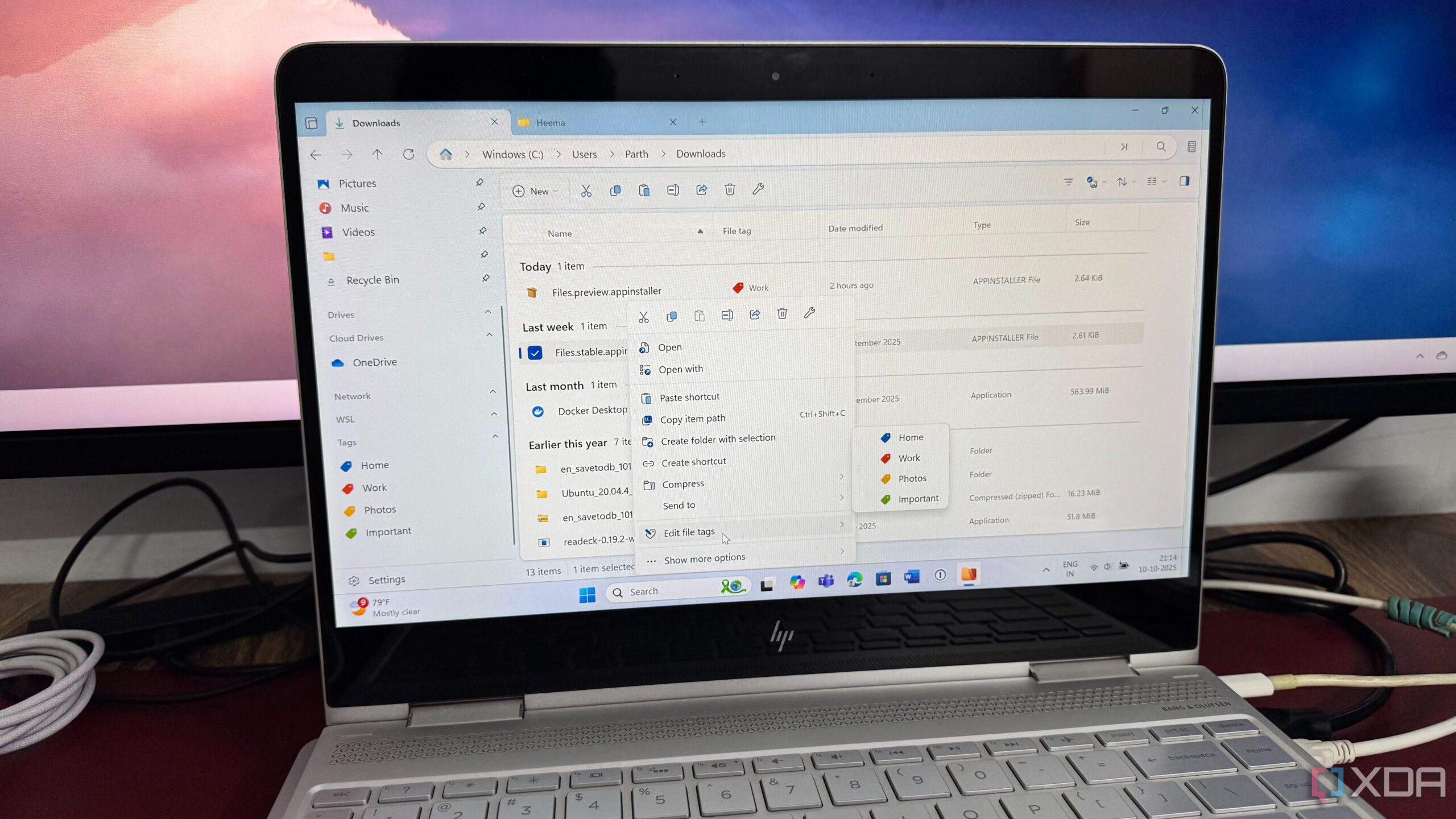
Windows users often find the built-in File Explorer lacking in speed and functionality. Many have experienced frustration due to its sluggish performance and limited features. Recently, I made the decision to transition from the standard File Explorer to the Files app, a free and open-source alternative that has significantly enhanced my productivity.
Identifying the Limitations of Windows File Explorer
The standard Windows File Explorer has long been a bottleneck for users seeking efficiency. Although it has received updates, including a user interface overhaul and tab support, it still leaves much to be desired. For instance, when attempting to access folders containing hundreds of images or large files, I often encountered lagging thumbnails and an unresponsive window.
The most significant drawback is the absence of advanced organizational tools. Coming from a Mac environment where Finder offers robust features, I found Windows File Explorer inadequate for effectively locating specific files across multiple projects. This prompted my search for a more capable file management solution.
The Files App: A Modern Solution
Upon discovering the Files app, I was immediately impressed by its user interface. It stands out not just for its functional enhancements but also for its appealing design, aligning perfectly with the modern Windows Fluent aesthetic seen in Windows 11. The layout is clean, and navigation between folders is smooth, offering a visually pleasing experience.
One of the standout features of the Files app is its support for tags. Unlike the native File Explorer, which lacks this capability, the Files app allows users to assign custom, color-coded tags to files and folders. This flexibility enables me to organize my files without being restricted by a traditional folder structure, streamlining my workflow significantly.
The Files app also includes a Dual Pane view, allowing users to view two folders side-by-side. This feature has proven invaluable, as it simplifies file management tasks, such as transferring files between locations. Additionally, options like the Preview panel, QuickLook support, and Git integration cater to various user preferences.
Community-Driven Development
The open-source nature of the Files app means that it is continuously evolving, with community contributions driving improvements and feature enhancements. Users can download and install the app for free, benefiting from ongoing updates without incurring any costs. For those who appreciate the development team’s efforts, a one-time payment of around $10 via the Microsoft Store can help support the project and ensure its sustainability.
Switching to the Files app has transformed my file management process, eliminating the frustrations associated with Windows File Explorer. The combination of a polished user interface, advanced organizational tools, and community-driven support has made it a worthy replacement.
In conclusion, if you’re looking to enhance your productivity and experience a truly modern file manager on Windows, consider downloading the Files app. It could be the upgrade you didn’t know you needed, making file management not just efficient but enjoyable as well.













Revolutionary Photonic Ski-Jump Could Miniaturize LiDAR Systems

Couples Detox from Plastics in New Netflix Doc: Can It Boost Fertility?

Aventon Launches Affordable Full-Suspension Electric Mountain Bike

Discover Eight Must-Try Restaurants This Spring Season

UC Irvine Team Unveils Innovative Ion Pump for Water Treatment

One-Third of Americans Trim Daily Expenses for Healthcare Needs

Apple Secures First Oscar in Three Years with F1: The Movie

Fourth Graders Celebrate St. Patrick’s Day with Creative Weather Drawings

Kim Kardashian Dazzles at Vanity Fair Oscars Party 2026

Nostradamus’ 2026 Predictions: Star Death and Dark Events Loom

Breakthroughs and Challenges Await Science in 2026

Electric Moto Influencer Surronster Arrested in Tijuana

OpenAI to Implement Age Verification for ChatGPT by December 2025

Discover the Top 10 Calorie Counting Apps of 2025

Recovering a Suspended TikTok Account: A Step-by-Step Guide

Bella Hadid Shares Health Update After Treatment for Lyme Disease

Backpack Drives Equip Students with Supplies for New School Year

Analysts Project Stronger Growth for Apple’s iPhone 17 Lineup
-
 Science8 months ago
Nostradamus’ 2026 Predictions: Star Death and Dark Events Loom
-
 Science8 months ago
Breakthroughs and Challenges Await Science in 2026
-
 Technology11 months ago
Electric Moto Influencer Surronster Arrested in Tijuana
-
 Technology9 months ago
OpenAI to Implement Age Verification for ChatGPT by December 2025
-
 Technology1 year ago
Discover the Top 10 Calorie Counting Apps of 2025
-
 Technology1 year ago
Recovering a Suspended TikTok Account: A Step-by-Step Guide
-
 Health11 months ago
Bella Hadid Shares Health Update After Treatment for Lyme Disease
-
 Education1 year ago
Backpack Drives Equip Students with Supplies for New School Year
-
 Health12 months ago
Analysts Project Stronger Growth for Apple’s iPhone 17 Lineup
-

 Health12 months ago
Japanese Study Finds Rose Oil Can Increase Brain Gray Matter
-

 Technology8 months ago
Top 10 Penny Stocks to Watch in 2026 for Strong Returns
-

 Science10 months ago
Starship V3 Set for 2026 Launch After Successful Final Test of Version 2