
Technology
Unlock Enhanced Virtualization with Proxmox VE Local Tool


Proxmox has solidified its position as a leading virtualization platform, especially with the introduction of Proxmox VE Local, a free self-hosted tool that enhances the deployment and management of virtual machines (VMs) and Linux Containers (LXCs). This innovative utility simplifies the execution of scripts from the popular Proxmox VE Helper-Scripts repository, making it an essential addition for users seeking to optimize their home lab environments.
The Proxmox VE Helper-Scripts repository is widely recognized for its ability to streamline the creation of VMs and containers with minimal commands. While Proxmox offers official tools like the Backup Server and Datacenter Manager, the community-driven aspect of Proxmox provides a wealth of scripts that can significantly enhance functionality. Users are advised to review the scripts carefully before execution to ensure smooth operation.
Streamlined Deployment with Centralized Management
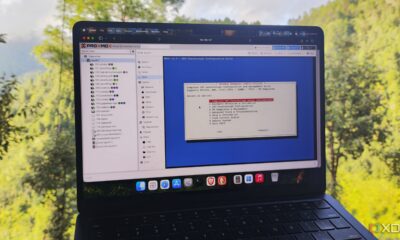
On the surface, Proxmox VE Local may appear to be a caching application for the PVE Helper Scripts. However, its most significant advantage lies in its ability to execute scripts on remote nodes through a centralized user interface. This feature proves invaluable for those managing multiple standalone or clustered Proxmox systems. After downloading a template and linking Proxmox VE Local to the corresponding PVE nodes, users can execute VM and LXC scripts via SSH from the appropriate workstation. This capability eliminates the need to navigate through various web interfaces, enhancing overall efficiency.
The tool also offers flexibility in template selection, allowing users to choose between different versions for containers and VMs, particularly those based on Debian and Alpine. Moreover, Proxmox VE Local simplifies the configuration process, enabling advanced options to be set before deployment. Its menu-like interface makes adjusting these settings far more user-friendly compared to traditional command-line methods.
One notable challenge when deploying multiple virtual guests through the PVE Helper-Scripts repository is the session persistence issue. If a script is interrupted—due to a VM crash or a user switching tabs—the user loses access to the session, which can hinder troubleshooting efforts. Proxmox VE Local addresses this concern by executing scripts over an SSH connection, allowing live terminal output to remain visible on the Proxmox VE Local page. This feature offers continuity and enhances the user experience during deployment.
Comprehensive Management and Backup Capabilities
Beyond basic deployment, Proxmox VE Local automatically identifies virtual guests created via the PVE Helper-Scripts repository. This functionality enables users to modify configurations without the need to switch to their Proxmox nodes. One particularly valuable feature is the update facility, which installs the latest packages related to a chosen template, a significant advantage for LXCs meant for self-hosting free and open-source software (FOSS) utilities. Proxmox VE Local also provides options to adjust CPU, memory, storage, and network settings, alongside access to features like FUSE and Keyctl, which may not be readily available through the Proxmox web interface.
In addition to deployment and management, Proxmox VE Local includes backup capabilities for virtual guests. By connecting directly with the underlying PVE workstations, it can access local pools, PBS datastores, and other storage devices configured on server nodes. However, a limitation exists in the Backups tab, which does not display snapshots stored on PBS servers, a point users may find noteworthy.
Setting up Proxmox VE Local is designed to be user-friendly. While it’s possible to create a new LXC manually, the simplest method involves executing a command within the Shell tab of a PVE node. By running the command bash -c “$(curl -fsSL https://raw.githubusercontent.com/community-scripts/ProxmoxVE/main/ct/debian.sh)”, users can quickly create a container equipped with all necessary packages. Following this, users can pair the tool with their server and other nodes, download templates, and begin deploying virtual guests efficiently.
Proxmox VE Local represents a significant advancement in the realm of virtualization tools, offering enhanced functionality and ease of use for both novice and experienced users. As the Proxmox community continues to grow, this tool is expected to play a pivotal role in optimizing the management of virtual environments.






Revolutionary Photonic Ski-Jump Could Miniaturize LiDAR Systems

Couples Detox from Plastics in New Netflix Doc: Can It Boost Fertility?

Aventon Launches Affordable Full-Suspension Electric Mountain Bike

Discover Eight Must-Try Restaurants This Spring Season

UC Irvine Team Unveils Innovative Ion Pump for Water Treatment

One-Third of Americans Trim Daily Expenses for Healthcare Needs

Apple Secures First Oscar in Three Years with F1: The Movie

Fourth Graders Celebrate St. Patrick’s Day with Creative Weather Drawings

Kim Kardashian Dazzles at Vanity Fair Oscars Party 2026

Nostradamus’ 2026 Predictions: Star Death and Dark Events Loom

Breakthroughs and Challenges Await Science in 2026

Electric Moto Influencer Surronster Arrested in Tijuana

OpenAI to Implement Age Verification for ChatGPT by December 2025

Discover the Top 10 Calorie Counting Apps of 2025

Bella Hadid Shares Health Update After Treatment for Lyme Disease

Analysts Project Stronger Growth for Apple’s iPhone 17 Lineup

Japanese Study Finds Rose Oil Can Increase Brain Gray Matter

Top 10 Penny Stocks to Watch in 2026 for Strong Returns
-
 Science3 months ago
Nostradamus’ 2026 Predictions: Star Death and Dark Events Loom
-
 Science4 months ago
Breakthroughs and Challenges Await Science in 2026
-
 Technology7 months ago
Electric Moto Influencer Surronster Arrested in Tijuana
-
 Technology4 months ago
OpenAI to Implement Age Verification for ChatGPT by December 2025
-
 Technology9 months ago
Discover the Top 10 Calorie Counting Apps of 2025
-
 Health7 months ago
Bella Hadid Shares Health Update After Treatment for Lyme Disease
-
 Health7 months ago
Analysts Project Stronger Growth for Apple’s iPhone 17 Lineup
-
 Health7 months ago
Japanese Study Finds Rose Oil Can Increase Brain Gray Matter
-
 Technology4 months ago
Top 10 Penny Stocks to Watch in 2026 for Strong Returns
-

 Science6 months ago
Starship V3 Set for 2026 Launch After Successful Final Test of Version 2
-

 Technology1 month ago
Nvidia GTC 2026: Major Announcements Expected for AI and Hardware
-

 Education7 months ago
Harvard Secures Court Victory Over Federal Funding Cuts