
Technology
Transform Your Server Experience with FileBrowser Quantum

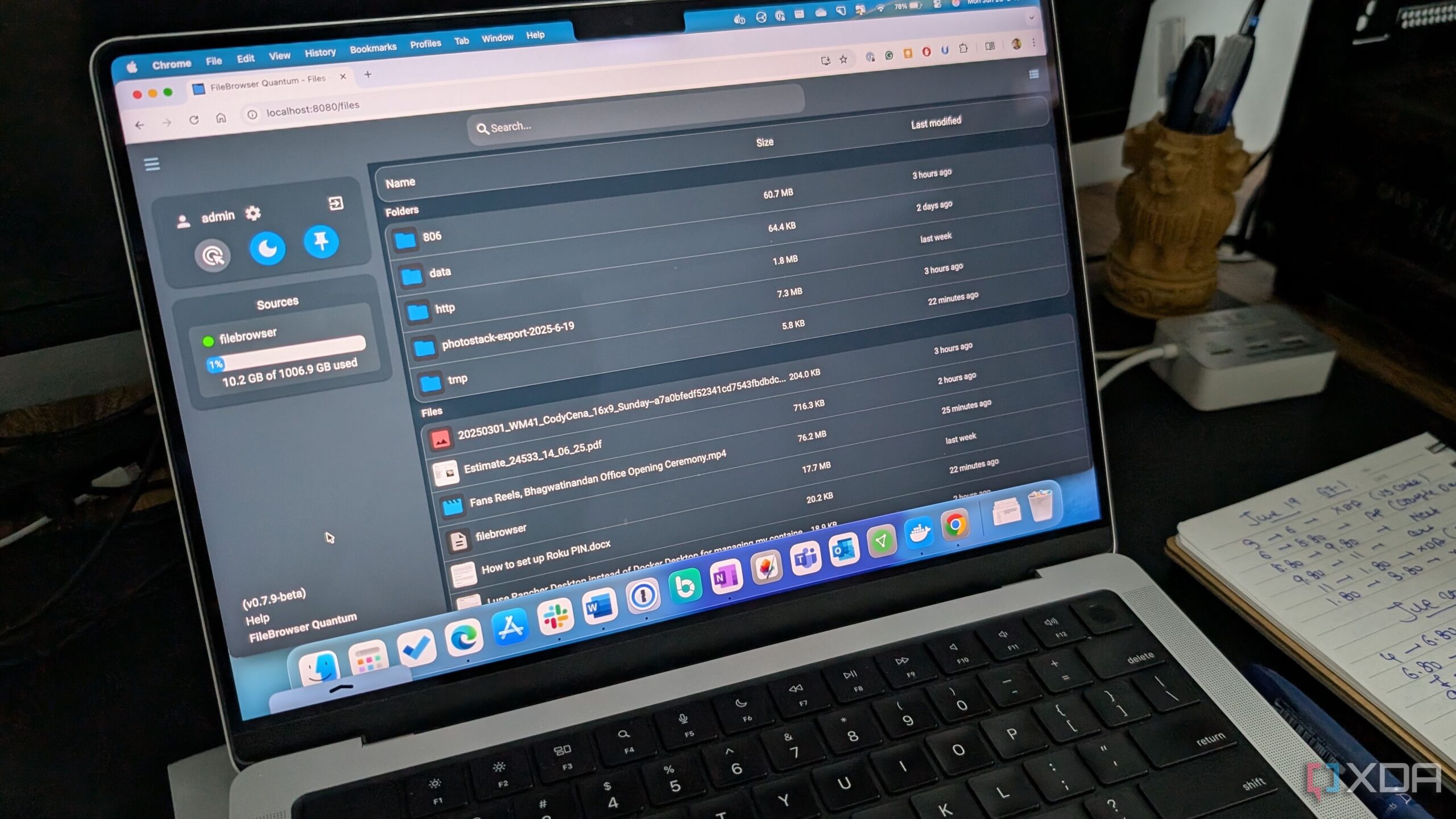
File management on home servers often presents a challenge for users seeking efficient solutions. Traditional methods, such as terminal commands, can be cumbersome when dealing with large batches of files. On the other hand, comprehensive software suites like Nextcloud may feel excessive for straightforward tasks. This led to the emergence of FileBrowser Quantum, an innovative tool that simplifies file management by transforming a server’s file system into a user-friendly web interface.
Introducing FileBrowser Quantum
The original FileBrowser was widely regarded as the gold standard for web-based file management. It provided a simple solution, utilizing a single Go binary to create a visually appealing interface for any folder. However, as technology progressed, the original project fell into a state of maintenance, lagging behind advancements in security and performance. The arrival of FileBrowser Quantum marks a significant evolution in this domain.
Developed as a fork of the original tool, Quantum focuses on modernizing the user experience without the bloat often associated with traditional cloud operating systems. Unlike platforms that attempt to be all-in-one solutions, FileBrowser Quantum streamlines the process of file management. It operates as a lightweight Docker container, providing a professional-grade interface for server files accessible from any browser.
Unmatched Performance and Features
One of the most notable aspects of FileBrowser Quantum is its performance. Users often find web-based file managers sluggish when navigating extensive directories filled with high-resolution images or large log files. Quantum addresses this issue by maintaining a lightweight, in-memory index of the file structure, allowing real-time updates and rapid search capabilities. This results in a seamless user experience where searching for files feels instantaneous.
FileBrowser Quantum’s Docker image is impressively compact, occupying around 180MB, which is smaller than many basic web applications. This efficiency is crucial in an era where many file management solutions consume significant system resources. Additionally, Quantum supports various media formats, including 4K video streaming and audio playback, enabling users to manage their media libraries effortlessly.
The user interface of FileBrowser Quantum is modern and intuitive, designed for ease of use. Security is a priority, with support for OpenID Connect and two-factor authentication, ensuring that user data remains protected. Furthermore, Quantum integrates seamlessly with OnlyOffice, transforming the browser into a fully functional productivity suite. This feature allows users to edit documents in real-time, similar to platforms like Google Docs, enhancing the overall functionality of the tool.
For those who frequently work with configuration files, Quantum includes a built-in editor that functions akin to a simplified version of VS Code. This integration highlights the tool’s versatility, bridging the gap between file management and practical usage.
As technology evolves, the need for efficient and user-friendly file management solutions continues to grow. FileBrowser Quantum meets this demand by providing a balance of minimalism and advanced features. Users who have relied on the old FileBrowser or slower methods of file transfer, such as SFTP, may find that Quantum offers a refreshing alternative.
In conclusion, FileBrowser Quantum stands out as a powerful tool for anyone looking to enhance their file management experience. It removes the headaches associated with traditional methods and provides a fast, efficient platform for managing server files. For those interested in exploring additional Docker containers to optimize their workflows, Quantum is a compelling option that should not be overlooked.



Revolutionary Photonic Ski-Jump Could Miniaturize LiDAR Systems

Couples Detox from Plastics in New Netflix Doc: Can It Boost Fertility?

Aventon Launches Affordable Full-Suspension Electric Mountain Bike

Discover Eight Must-Try Restaurants This Spring Season

UC Irvine Team Unveils Innovative Ion Pump for Water Treatment

One-Third of Americans Trim Daily Expenses for Healthcare Needs

Apple Secures First Oscar in Three Years with F1: The Movie

Fourth Graders Celebrate St. Patrick’s Day with Creative Weather Drawings

Kim Kardashian Dazzles at Vanity Fair Oscars Party 2026

Nostradamus’ 2026 Predictions: Star Death and Dark Events Loom

Breakthroughs and Challenges Await Science in 2026

Electric Moto Influencer Surronster Arrested in Tijuana

OpenAI to Implement Age Verification for ChatGPT by December 2025

Discover the Top 10 Calorie Counting Apps of 2025

Bella Hadid Shares Health Update After Treatment for Lyme Disease

Analysts Project Stronger Growth for Apple’s iPhone 17 Lineup

Japanese Study Finds Rose Oil Can Increase Brain Gray Matter

Top 10 Penny Stocks to Watch in 2026 for Strong Returns
-
 Science4 months ago
Nostradamus’ 2026 Predictions: Star Death and Dark Events Loom
-
 Science4 months ago
Breakthroughs and Challenges Await Science in 2026
-
 Technology7 months ago
Electric Moto Influencer Surronster Arrested in Tijuana
-
 Technology4 months ago
OpenAI to Implement Age Verification for ChatGPT by December 2025
-
 Technology9 months ago
Discover the Top 10 Calorie Counting Apps of 2025
-
 Health7 months ago
Bella Hadid Shares Health Update After Treatment for Lyme Disease
-
 Health7 months ago
Analysts Project Stronger Growth for Apple’s iPhone 17 Lineup
-
 Health8 months ago
Japanese Study Finds Rose Oil Can Increase Brain Gray Matter
-
 Technology4 months ago
Top 10 Penny Stocks to Watch in 2026 for Strong Returns
-

 Science6 months ago
Starship V3 Set for 2026 Launch After Successful Final Test of Version 2
-

 Technology2 months ago
Nvidia GTC 2026: Major Announcements Expected for AI and Hardware
-

 Education7 months ago
Harvard Secures Court Victory Over Federal Funding Cuts