
Technology
Lofree Flow 2 84 Keyboard Delivers Mechanical Experience for Mac Users

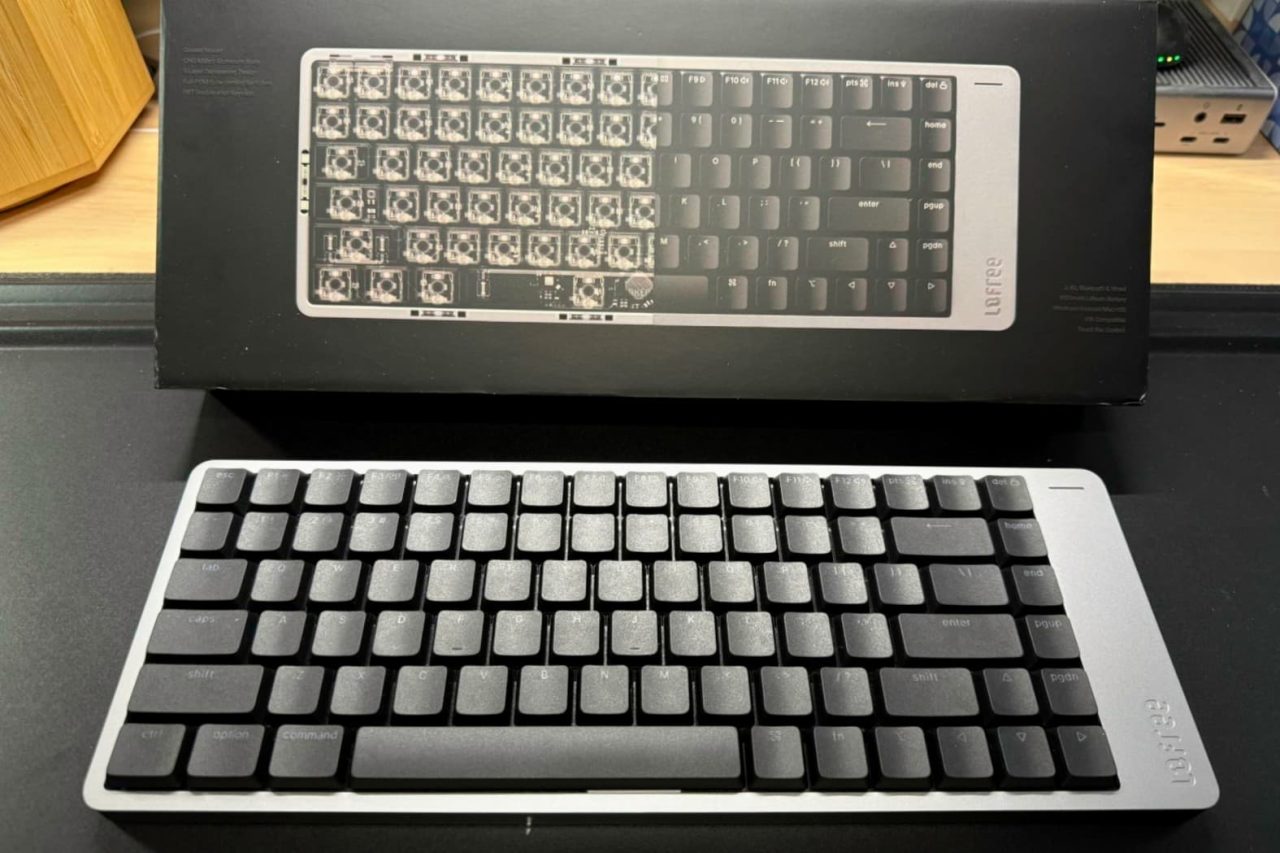
The Lofree Flow 2 84 has emerged as a compelling option for Mac users seeking a mechanical keyboard that balances functionality with the familiar feel of Apple’s products. This low-profile keyboard offers a seamless transition from the traditional Apple Magic Keyboard while delivering the benefits of a mechanical typing experience.
Design and Features
The Lofree Flow 2 84 is designed with modern workspaces in mind. It features a sleek, precision CNC aluminum chassis that provides both durability and a contemporary aesthetic. The keyboard’s 75 percent layout includes dedicated arrow keys and a function row, all while maintaining a compact footprint.
Ergonomically crafted for extended use, the Flow 2 84 includes hot-swappable low-profile mechanical switches and uniquely shaped keycaps that enhance comfort. Users can connect via three modes: wired, Bluetooth, and 2.4 GHz wireless. This flexibility makes it suitable for both desktop setups and mobile workstations.
Key features include:
– 84 keys in a compact layout
– Ultra-sleek anodized aluminum body
– New 40gf POM Cloud Series switches
– Touch-sensitive bar for volume and brightness adjustments
– Built-in flip-out keyboard kickstand
– Compatibility with VIA for custom key remapping
The Flow 2 84 is priced at $159.00 on Lofree’s official website and $169.99 on Amazon.
User Experience and Performance
Typing comfort was a priority during my weeks of testing the Lofree Flow 2 84. I utilized it as my primary keyboard for various tasks, from drafting articles to final edits. The keyboard felt comfortable from the start, allowing for long typing sessions without significant fatigue or errors. In fact, I achieved an impressive typing speed of 79 words per minute, surpassing my usual average of 73.
The keyboard’s design integrates well with macOS, making the transition from the Apple Magic Keyboard smooth. Key functions such as app switching and window management worked intuitively without requiring any adjustment. I primarily used the Bluetooth connection, which proved reliable and free from interruptions.
One notable aspect was the keyboard’s low profile. It sits flat on the desk, which may not suit everyone’s preferences. While I found it acceptable, some users might prefer a higher typing angle.
Desk ergonomics also received high marks. The keyboard fit seamlessly into my existing setup, and my posture remained comfortable throughout long writing sessions. The Flow 2 84’s weight kept it stable, ensuring no unwanted movement during use.
Overall, the Lofree Flow 2 84 stands out as a mechanical keyboard that caters well to Mac users. It bridges the gap between traditional mechanical options and the sleek design of Apple products. While it may not fulfill every user’s preferences, particularly regarding typing angles, it provides a formidable option for those looking to explore mechanical keyboards without sacrificing the familiar feel of macOS.
For more details, visit the official site at lofree.co.












Revolutionary Photonic Ski-Jump Could Miniaturize LiDAR Systems

Couples Detox from Plastics in New Netflix Doc: Can It Boost Fertility?

Aventon Launches Affordable Full-Suspension Electric Mountain Bike

Discover Eight Must-Try Restaurants This Spring Season

UC Irvine Team Unveils Innovative Ion Pump for Water Treatment

One-Third of Americans Trim Daily Expenses for Healthcare Needs

Apple Secures First Oscar in Three Years with F1: The Movie

Fourth Graders Celebrate St. Patrick’s Day with Creative Weather Drawings

Kim Kardashian Dazzles at Vanity Fair Oscars Party 2026

Nostradamus’ 2026 Predictions: Star Death and Dark Events Loom

Breakthroughs and Challenges Await Science in 2026

OpenAI to Implement Age Verification for ChatGPT by December 2025

Electric Moto Influencer Surronster Arrested in Tijuana

Discover the Top 10 Calorie Counting Apps of 2025

Bella Hadid Shares Health Update After Treatment for Lyme Disease

Analysts Project Stronger Growth for Apple’s iPhone 17 Lineup

Top 10 Penny Stocks to Watch in 2026 for Strong Returns

Japanese Study Finds Rose Oil Can Increase Brain Gray Matter
-
 Science3 months ago
Nostradamus’ 2026 Predictions: Star Death and Dark Events Loom
-
 Science3 months ago
Breakthroughs and Challenges Await Science in 2026
-
 Technology4 months ago
OpenAI to Implement Age Verification for ChatGPT by December 2025
-
 Technology6 months ago
Electric Moto Influencer Surronster Arrested in Tijuana
-
 Technology8 months ago
Discover the Top 10 Calorie Counting Apps of 2025
-
 Health6 months ago
Bella Hadid Shares Health Update After Treatment for Lyme Disease
-
 Health7 months ago
Analysts Project Stronger Growth for Apple’s iPhone 17 Lineup
-
 Technology3 months ago
Top 10 Penny Stocks to Watch in 2026 for Strong Returns
-
 Health7 months ago
Japanese Study Finds Rose Oil Can Increase Brain Gray Matter
-

 Science5 months ago
Starship V3 Set for 2026 Launch After Successful Final Test of Version 2
-

 Education7 months ago
Harvard Secures Court Victory Over Federal Funding Cuts
-

 Technology4 weeks ago
Nvidia GTC 2026: Major Announcements Expected for AI and Hardware