
Education
Simplifying Project Planning with Obsidian’s Linking Features

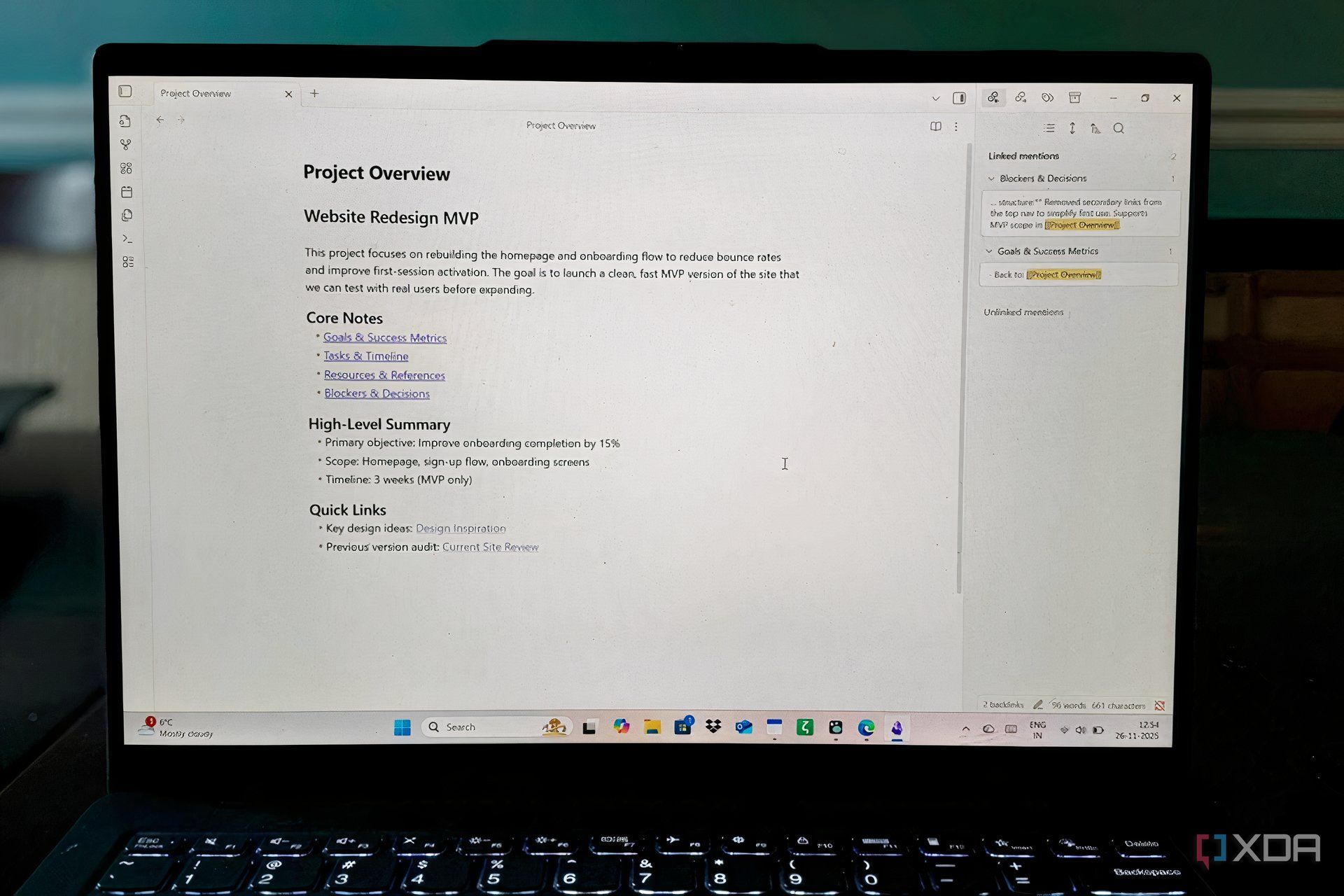
Creating an effective project management strategy can often seem overwhelming, especially when faced with complex tools and methodologies. Many users have shied away from using Obsidian, a powerful note-taking application, due to its reputation for complexity. However, a simple approach utilizing its core linking feature can enable users to map an entire project efficiently, all within a very short time frame.
Obsidian’s unique double-bracket linking system allows users to connect notes seamlessly. By simply typing [[note name]], individuals can create a link to another note. This straightforward method enables users to build a navigable project map using just five interconnected notes, forming a coherent structure that can be visualized in the application’s graph view. This is not about creating an elaborate knowledge management system but rather about demonstrating how Obsidian can effectively assist in planning a project in the time it takes to watch a sitcom episode.
Why Complexity Is Overrated
The Obsidian community has developed a culture of optimization, often showcasing intricate setups involving numerous plugins and custom workflows. While these elaborate systems can be impressive, they create a steep learning curve for newcomers. Many potential users feel they must understand and implement various plugins before they can even begin their projects. In reality, the fundamental linking feature of Obsidian is sufficient for establishing a clear project structure.
The power of this linking system lies in its simplicity. For instance, by linking notes such as [[Project Goals]], users can instantly create a connection that enhances navigability. When five notes are linked together, the graph view automatically generates a visual representation of these connections, allowing users to see how various elements of the project relate to one another without the need for manual diagrams.
The Five-Note Framework for Success
A practical framework that can be set up in approximately **20 minutes** consists of the following notes:
1. **Project Overview** — This serves as the anchor note, summarizing the project’s objectives and linking to the other four notes. A concise, three-sentence description can provide clarity on the project’s scope.
2. **Goals & Success Metrics** — This note outlines what success looks like, including **3-5 concrete goals** linked back to the Project Overview. By centralizing goal-related discussions, users can maintain focus throughout the project lifecycle.
3. **Tasks & Timeline** — Action items are organized into phases, with bullet points linking relevant tasks to the defined goals. For example, a task like “Design homepage mockup” can link directly to a corresponding goal, ensuring that all tasks are traceable.
4. **Resources & References** — This section includes links to external documents, URLs, or other notes, providing essential background information. As research progresses, new notes can be easily linked to this resource hub.
5. **Blockers & Decisions** — This note captures any problems or decisions that arise during the project. By linking resolved issues back to relevant tasks or goals, users create a documented trail of how obstacles were navigated.
The strategic use of linking transforms the project’s anatomy, allowing the graph view to act as a dynamic map of dependencies. As users reference other notes, they organically build a project’s nervous system, revealing connections and insights that may not have been previously considered.
Upon opening the graph view for the first time after establishing these five notes, users can visualize their project as a cohesive web rather than a disorganized collection of documents. This visualization highlights how different components interconnect, facilitating a deeper understanding of the project’s structure.
Unlike other project management tools that require rigid frameworks, such as databases or Kanban boards, Obsidian allows users to maintain flexibility. New notes can be incorporated without disrupting the existing structure, making it easy to adapt as the project evolves. For instance, if new stakeholder feedback is required, users can create a [[Stakeholder Input]] note, link it appropriately, and watch as the graph updates in real time.
Moreover, Obsidian’s command palette streamlines the note creation and navigation process, allowing for a keyboard-first approach. This efficiency promotes a focus on writing rather than organizing, which can often become cumbersome in traditional project management software.
While advanced users may choose to enhance their experience with plugins, the minimal five-note framework effectively demonstrates that success does not necessitate complexity. The core features of Obsidian, available in the free version, empower users to create a clear project overview without a steep learning curve.
In conclusion, for those who have hesitated to engage with Obsidian due to its perceived intricacies, this approach offers a viable entry point. In just **twenty minutes**, users can establish a clear, interconnected project overview that enhances their ability to think critically about their work. The graph view not only displays the project but also aids in understanding its components and relationships, proving that simplicity can be a powerful ally in project management.













Revolutionary Photonic Ski-Jump Could Miniaturize LiDAR Systems

Couples Detox from Plastics in New Netflix Doc: Can It Boost Fertility?

Aventon Launches Affordable Full-Suspension Electric Mountain Bike

Discover Eight Must-Try Restaurants This Spring Season

UC Irvine Team Unveils Innovative Ion Pump for Water Treatment

One-Third of Americans Trim Daily Expenses for Healthcare Needs

Apple Secures First Oscar in Three Years with F1: The Movie

Fourth Graders Celebrate St. Patrick’s Day with Creative Weather Drawings

Kim Kardashian Dazzles at Vanity Fair Oscars Party 2026

Nostradamus’ 2026 Predictions: Star Death and Dark Events Loom

Breakthroughs and Challenges Await Science in 2026

Electric Moto Influencer Surronster Arrested in Tijuana

OpenAI to Implement Age Verification for ChatGPT by December 2025

Discover the Top 10 Calorie Counting Apps of 2025

Bella Hadid Shares Health Update After Treatment for Lyme Disease

Analysts Project Stronger Growth for Apple’s iPhone 17 Lineup

Japanese Study Finds Rose Oil Can Increase Brain Gray Matter

Top 10 Penny Stocks to Watch in 2026 for Strong Returns
-
 Science4 months ago
Nostradamus’ 2026 Predictions: Star Death and Dark Events Loom
-
 Science4 months ago
Breakthroughs and Challenges Await Science in 2026
-
 Technology7 months ago
Electric Moto Influencer Surronster Arrested in Tijuana
-
 Technology4 months ago
OpenAI to Implement Age Verification for ChatGPT by December 2025
-
 Technology9 months ago
Discover the Top 10 Calorie Counting Apps of 2025
-
 Health7 months ago
Bella Hadid Shares Health Update After Treatment for Lyme Disease
-
 Health7 months ago
Analysts Project Stronger Growth for Apple’s iPhone 17 Lineup
-
 Health7 months ago
Japanese Study Finds Rose Oil Can Increase Brain Gray Matter
-
 Technology4 months ago
Top 10 Penny Stocks to Watch in 2026 for Strong Returns
-

 Science6 months ago
Starship V3 Set for 2026 Launch After Successful Final Test of Version 2
-

 Technology1 month ago
Nvidia GTC 2026: Major Announcements Expected for AI and Hardware
-

 Education7 months ago
Harvard Secures Court Victory Over Federal Funding Cuts